Features
Reading
- Opens every PDF in Chrome: links, files on your computer, and PDFs inside pages such as Moodle.
- Find, zoom, print, thumbnails and the outline, like Chrome’s own viewer.
- Two-page view and presentation mode.
- Opens where you stopped last time.
- Drag thumbnails to reorder pages. The file itself never changes.
Marks and comments
- Highlight, underline, bold and strikethrough: one key each, or right-click.
- Comment with Ctrl+Alt+M. Notes sit in the margin, with replies.
- Click a figure or chart to comment on it.
- The Notes panel lists every note in the PDF.
- Notes stay with the PDF, even after you move, rename or download it again.
- Notes already in a PDF show up too.
- Download a copy of the PDF with your notes in it.
Library and courses
- Papers, readings and slides save to your library by themselves.
- Ctrl+K searches titles, full text and your notes.
- Readings are grouped by course, found from course codes. Rename or merge them.
- Tags by subject, Starred, Recent and related readings.
- Export all your notes as Markdown.
- Automatic backup to a folder you choose, and restore on a new computer.
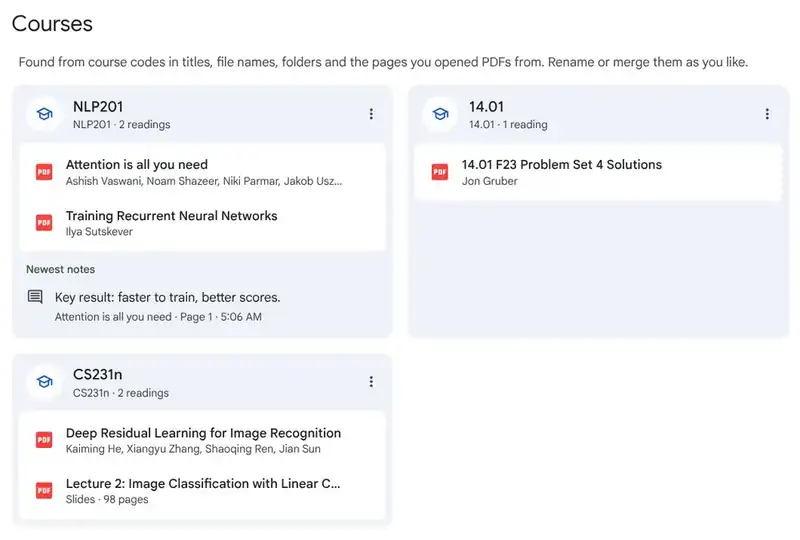 Courses, found for you.
@Claude
- Type @Claude in any note to ask about the passage.
- Answers link to the page they come from.
- Ask about a figure: Claude sees the picture and its caption.
- It can search the web, and shows its sources.
- Press Think harder for a deeper answer.
- Uses your own Anthropic API key.
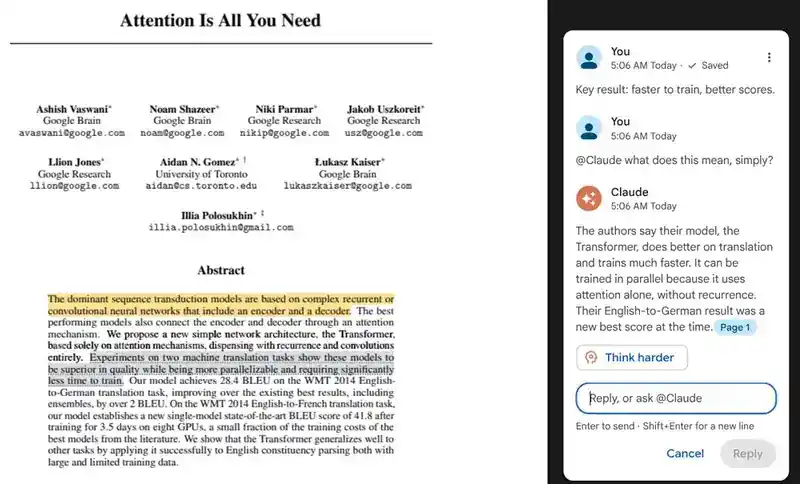 A note, a question, and Claude’s answer with a page link.
Scans
- Scanned pages are read on your computer, so you can select, mark and search them.
Phone and web
- Android app (coming soon): the same reader, with marks, comments and @Claude.
- Listen with ElevenReader: hear the PDF read aloud.
- Cloud sync and a web library (coming): join the waitlist.
Privacy
- Your PDFs and notes stay on your device.
- Receipts, bank statements and payslips are never saved.
- Nothing is sent unless you ask. No ads, no trackers. More on privacy